Product Hunt Launch Video: Length, Script and 5 Real Examples to Study
A Product Hunt video planning guide with a complete script, five verified launch-linked examples, production checks and honest limits on the available evidence.
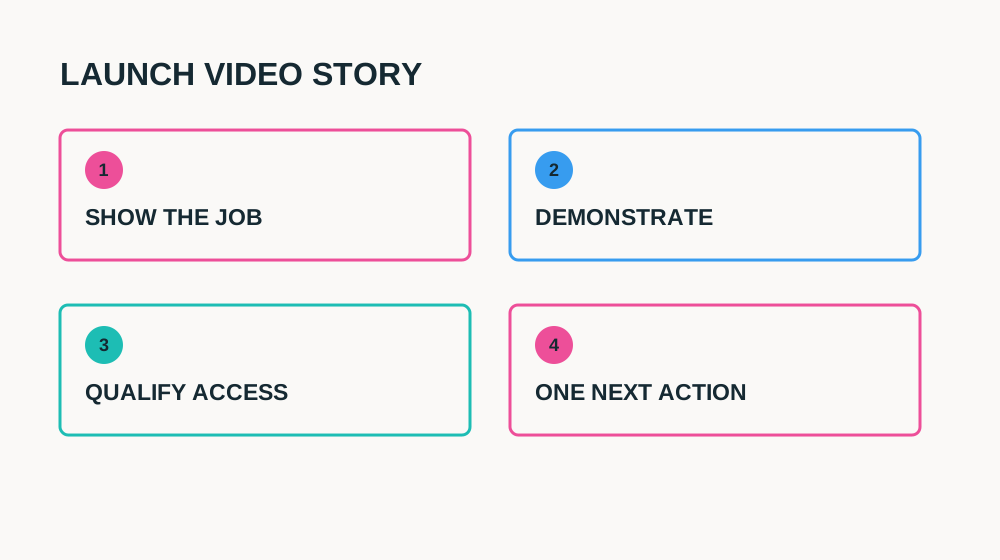
A Product Hunt launch video should answer what your product does before it asks anyone to celebrate the launch. The viewer may arrive from a gallery thumbnail without knowing the category. Give them one recognisable job, show the real product doing it and explain the next action. A short film full of logos and floating screens can look impressive while leaving that question unanswered.
This guide covers launch-video length, what to show first, a complete script, recording and five real public examples associated with Product Hunt launches. The examples are teaching material, not client campaigns or a ranking of launch performance. Where only a launch comment, thumbnail or indexed transcript could be verified, that boundary is stated rather than inventing a scene-by-scene viewing.
How Long Should a Product Hunt Launch Video Be?
For a simple SaaS workflow, draft a 45–75-second main video and then shorten only where meaning survives. That is an editorial recommendation, not a Product Hunt duration requirement. A complex technical product may benefit from a longer companion walkthrough. The gallery introduction should still establish the job quickly; do not make an unfamiliar viewer watch setup before understanding the result.
| Asset | Suggested starting range | Purpose |
|---|---|---|
| Gallery introduction | 45–75 seconds | One user, one workflow, one next action |
| Short social launch edit | 15–30 seconds | Introduce the result and lead to the full explanation |
| Companion walkthrough | 2–5 minutes or longer when necessary | Show setup and evaluation details the short version omits |
Product Hunt’s own creative tips discuss hooks, problem framing, demonstrations and a CTA: demo-video tips.
Check the current submission workflow in the official Product Hunt launch guide.
What to Show First: The Job and the Result
Start with a visible outcome and enough context to make it meaningful. A fictional approval app might show a request with a reviewer and reminder attached, labelled “Client approval, in one place.” Then show how the result was created. A result without input or explanation is just a screenshot; a long founder greeting without a result delays the reason to watch.
Avoid opening with your entire company history, a mystery tagline or a promise that the product replaces a whole role. Make plan, beta or access limitations visible where they matter. If the launch is a new version, say what changed without assuming everyone saw the earlier launch. Early adopters and completely new viewers should both be able to describe the job after the introduction.
A 60-Second Product Hunt Launch Video Script
| Time | Spoken line | Picture |
|---|---|---|
| 0–5s | “This is a client approval request with its reviewer and reminder in one place.” | Readable synthetic result; product name and task label |
| 5–12s | “If you are tracking sign-off across messages, here is the workflow.” | Presenter explains the task; minimal context |
| 12–29s | “Create a request, add the reviewer and choose a reminder date.” | Real input and actions in the approved product |
| 29–40s | “Here is the request state you can check before sending.” | Hold the result; no decorative montage |
| 40–50s | “This demo uses the eligible plan and a test workspace.” | Replace with verified access and material qualification |
| 50–60s | “Open the launch page to read the details and try this task.” | One accurate next action, not a demand for votes |
Use the actual product build and verified facts before filming. If the demo requires an integration or administrator setup, do not leave it out merely to fit the minute. Put a short qualification in the main video and explain setup in the companion walkthrough. A founder or creator can keep the explanation human, but the screen must substantiate the capability.
Product Hunt launch-video brief
PRODUCT HUNT LAUNCH VIDEO
User and task: [one recognisable job]
Opening result: [approved screenshot/state]
Input: [synthetic, representative example]
Three demo actions: [real click path]
Proof: [inspectable result]
Difference or update: [verified current capability]
Availability: [plan, beta, region, rollout]
Boundary: [setup/review/limitation]
Next action: [launch page or accurate trial path]
Captions/transcript: [reviewed]
Gallery upload: [current platform workflow checked]
Longer walkthrough: [optional setup resource]
5 Real Product Hunt-Connected Videos to Study
All five YouTube URLs had available oEmbed metadata during research on October 31, 2026. That confirms a listed embed, not guaranteed playback in every region. Launch connections were checked through spoken launch references, archived maker comments or Tella’s published review. No sales or vote result is attributed to the videos. The notes distinguish verified content from lessons for your own script.
1. ReachLLM
ReachLLM — public product demo
Loading this video connects to www.youtube-nocookie.com, which may collect your IP address and use cookies.
The indexed introduction starts with the maker and earlier-launch context, then explains entering a brand name and domain. The inspected thumbnail shows a dark Brand Visibility Analysis screen with a presenter inset; the transcript describes analysis across multiple language models. These are the verified communication elements, not independently tested accuracy claims.
For your version, shorten launch history unless existing users need it. Move the specific input and understandable output ahead of background. A visibility tool also needs to explain what its measurement actually means; an attractive score is not proof of universal search visibility. The final scene could not be verified, so no closing sequence is asserted.
2. Soma
Soma — public product demo
Loading this video connects to www.youtube-nocookie.com, which may collect your IP address and use cookies.
The spoken opening addresses Product Hunt and frames engineers handling an incident across multiple tabs. The available transcript describes consolidating context from a pull request, alert and message thread, then asking about coworkers’ work. The inspected thumbnail shows a question-entry interface and source-related copy. The closing transcript mentions private beta and a demo or waitlist invitation, although its final words were truncated.
The useful structure is problem → contextual input → question → eligible next action. For a technical tool, this is more informative than calling it an “AI teammate” without an operational task. Claims about preventing hallucinations remain presenter claims; your own video should show sources and review boundaries rather than imply error-free output.
3. SayCraft
SayCraft — public product demo
Loading this video connects to www.youtube-nocookie.com, which may collect your IP address and use cookies.
The inspected thumbnail says “Talk your meeting into a product” and “The whole room talks. The AI builds live,” alongside a dashboard graphic and live-meeting label. That is an outcome-led promise with recognisable input context. The available evidence does not establish which intermediate screens or closing shots appear, so this is a breakdown of the verified framing rather than an invented workflow narration.
The lesson for your launch is to connect the input people already have with a concrete result. Then make your own footage prove the path. If the tool generates a build, show the result being inspected and clarify what still needs review; a slogan alone cannot establish readiness or reliability.
Launch-context source: archived SayCraft maker comment.
4. Rix.chat
Rix.chat — public product demo
Loading this video connects to www.youtube-nocookie.com, which may collect your IP address and use cookies.
The inspected thumbnail uses RIX branding and a Product Demo label. The launch comment describes Web Search, Quick Mode, URL Summaries and Code Writer, but that description does not prove all four are shown in the video. The walkthrough’s metadata identifies it as an AI search engine for developers. It is a verified launch-linked resource, not evidence for a particular feature sequence.
For a multi-mode SaaS product, avoid turning the short launch introduction into four disconnected tours. Choose one developer question, demonstrate its answer with visible source context and link a longer walkthrough for other modes. Branding is useful for recognition, but your opening should also communicate what the product helps someone do.
Launch-context source: archived Hashnode launch comment.
5. Lobe
Lobe — public product demo
Loading this video connects to www.youtube-nocookie.com, which may collect your IP address and use cookies.
Tella’s published review describes a presenter collecting training pictures, creating a model, integrating it into an app and showing the resulting app. It notes screen recordings, camera recordings and transition slides. Those workflow details are attributed to the review; exact opening and ending shots were not independently verified. The inspected thumbnail pairs the presenter and laptop with “Machine Learning Made Easy.”
This example shows why a companion walkthrough can be longer than a launch introduction: the learning path itself is valuable. For your short edit, extract a clear result and one representative action rather than speeding through the entire tutorial. Retain the full explanation as optional evaluation content, and do not treat this historical video as a statement about current Lobe availability.
Launch-context source: Tella’s Product Hunt video review.
Record the Demo Before the Launch Speech
Build a repeatable synthetic workspace, test every step and capture the final output first. Then record the actions that create it. Finally film the founder or creator lines around the real footage. This order prevents a confident narration from promising a workflow the available build cannot support. Keep reset instructions so a revised take does not accidentally use different data.
Pause where viewers need to read, keep captions away from important controls and review the video at actual gallery size. Use accurate subtitles and an accessible written explanation. Music, logos and screen material need appropriate rights. If a public example stops loading later, retain the direct source link and written lesson rather than leaving a blank player as the only content.
Publish the Video With a Useful Gallery and Landing Path
Check the current Product Hunt submission interface and supported video workflow before launch day. Do not assume a file export that works elsewhere can be uploaded the same way. Use a truthful thumbnail and surrounding screenshots that complement the demo. Keep essential availability, pricing context and setup details in written launch material too, so people who do not play the video can still understand the product.
For an existing-product update rather than a full launch introduction, use the SaaS feature launch video guide.
Send interested viewers to the demonstrated task or an honest beta/waitlist explanation. Check the path while signed out and on a phone. If access is limited, say so before people submit information. Avoid manufactured testimonials, fake urgency or claims that a launch position proves product quality. Follow Product Hunt’s current community rules rather than making the video an instruction to manipulate voting.
Measure What Happens After Launch-Day Attention
Separate video exposure, launch-page engagement, destination visits, eligible signups and meaningful first use. Product Hunt visitors are not necessarily your long-term buyer cohort. A launch spike can reveal useful feedback without proving sustainable acquisition. Record attribution limits and revisit retention after a realistic interval for the product’s task.
Launch-video readiness
6 items still to confirm.
Product Hunt Launch Video FAQ
Does Product Hunt require a video?
The official launch guidance encourages a quick demo video. Do not treat a creative recommendation as a universal mandatory field; check the current submission process for your launch.
Is one minute a Product Hunt video limit?
No official one-minute requirement was established in the sources checked. One minute is a useful editorial draft for a straightforward task, not a substitute for current platform specifications.
Should the founder or a creator present it?
Either can work. A founder can explain product judgement; a creator can make the task concise and approachable. The presenter’s role and experience must be truthful, and the product footage still needs to prove the claim.
Need an accurate human explanation of your launch? See my SaaS video services.
Share
Article footer · AI discovery
Want to explore this topic further?
Ask questions about this article or use it as a starting point for deeper research.
Want content that makes your SaaS product click?
Email promotions@fuelyourdigital.com or explore my content packages.