Flowglad Case Study: 3 Winning UGC Videos and 65,828 Impressions
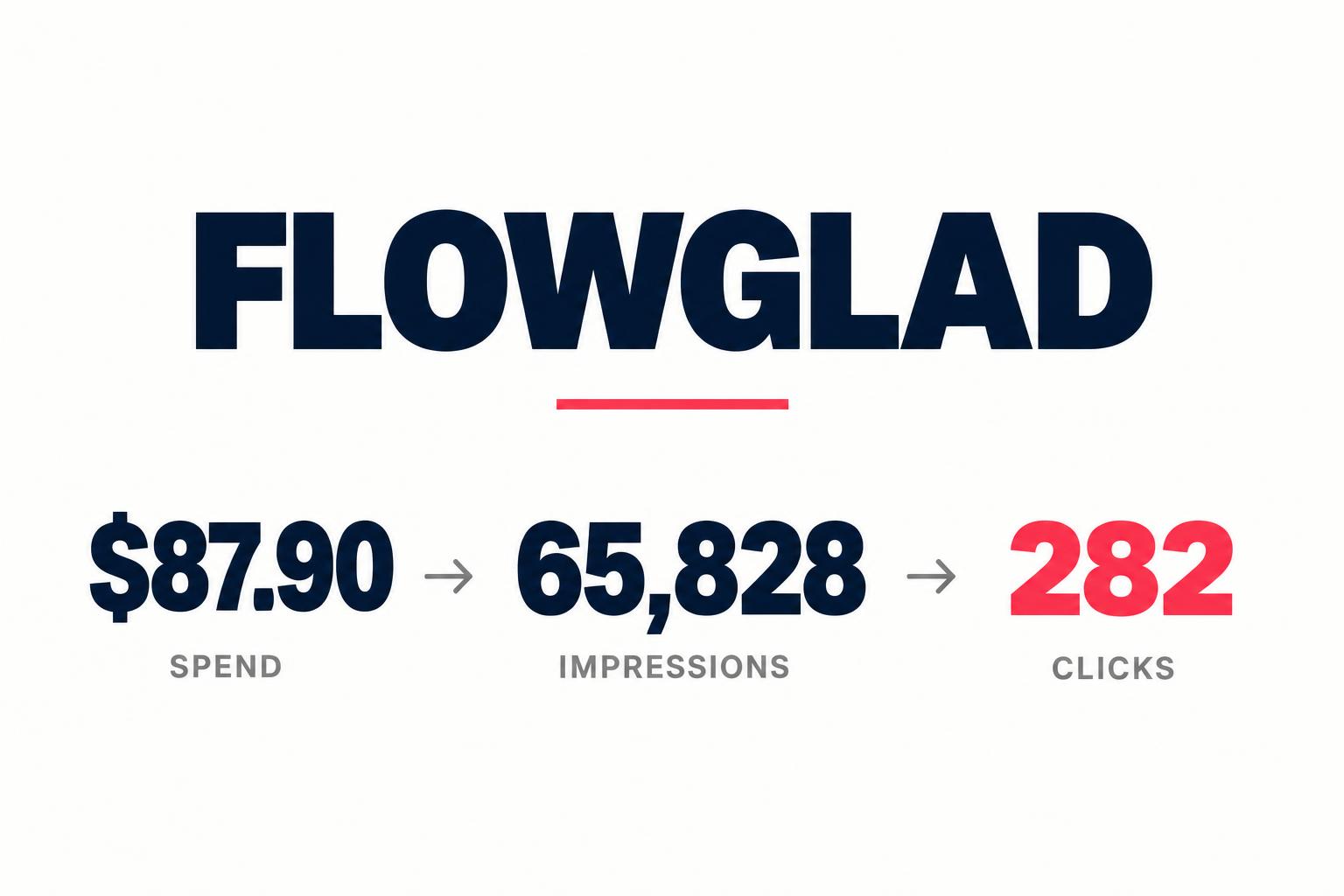
Three winning Flowglad videos, three distinct angles: switching AI agents, moving beyond chat and building useful workflows. The creator-level report shows 65,828 impressions and 282 clicks on $87.90.
For Flowglad, I created short-form videos that explain an AI product through problems and workflows people can recognize. This case study features the three main winning videos from that work: one about switching AI agents, one about using AI for more than chat, and one about three things you could build this week.
The supplied creator-level report records 65,828 impressions, 64,970 video starts and 282 clicks for my row, on $87.90 of reported spend. Those are campaign delivery and click results—not a claim about signups or revenue. The report does not split the figures by individual video, so I am not assigning a share of the totals to any one of these three clips.
The Results: 65,828 Impressions on $87.90

| Metric | Reported result | How to read it |
|---|---|---|
| Video starts | 64,970 | Starts as defined by the reporting platform; not full-length watches. |
| Spend | $87.90 | Reported media spend; does not include an established creator or production fee. |
| Impressions | 65,828 | Times the ads were displayed, not unique people reached. |
| Clicks | 282 | Reported clicks; the table does not specify destination, outbound or all-click definitions. |
| 2-second views | 5,898 | Views counted at the two-second threshold. |
| 6-second views | 1,897 | Views counted at the six-second threshold. |
The distinction between a start and an engaged view matters. A video can start in a feed without someone choosing to watch it. The 64,970 starts should not be described as 64,970 people watching the message, and impressions should not be relabeled as reach.
| Calculation | Result | Qualification |
|---|---|---|
| Spend ÷ impressions × 1,000 | About $1.34 CPM | Media cost per 1,000 reported impressions. |
| Spend ÷ clicks | About $0.31 per reported click | Not proven cost per website visitor or customer. |
| Clicks ÷ impressions × 100 | About 0.43% | Reported-click-to-impression ratio; click definition is unknown. |
| 6-second views ÷ 2-second views × 100 | About 32.2% | Ratio of two aggregate view thresholds, not full-video completion. |
The useful headline is efficient delivery and a measurable volume of clicks from a small reported media budget. It is not “the best creator by every metric.” This report alone cannot establish the strongest conversion performance, the highest-quality traffic or the best return on investment. I am focusing on my own work rather than turning different creators’ rows into a controlled creative comparison.
The Message: Turn AI Interest Into a Recognizable Task
The videos position Flowglad as a place to connect an AI agent to apps and build workflows, automations and dashboards. That is the campaign message visible in the supplied creative. Product capabilities mentioned in the scripts should be understood as campaign messaging, not an independent feature audit or a guarantee of current availability.
Instead of introducing the product with a long feature list, each video starts from a different reason to care. One viewer worries about rebuilding work when switching agents. Another is stuck copying answers between apps. A third needs ideas for what to make. That gives the same product three different entry points without repeating the same opening.
This is especially useful for technical software. “Connect your AI to your apps” is still abstract until the viewer can picture an email becoming a tracker entry, a spreadsheet becoming a dashboard, or a client receiving an onboarding sequence. The creator’s job is to make those relationships understandable before asking for the next step.
Watch the Three Main Winning Flowglad Videos
Video 1: Make Switching Costs the Problem
The first clip opens: “If you switch from Claude to another AI tomorrow, you lose everything you built.” It then names connections, automations and tools as the work a viewer does not want to rebuild. The argument shifts from the AI model itself to where the surrounding workflow lives.
The creative resolution is that connections, automations and dashboards live in Flowglad, while the viewer can plug in an agent. The script mentions Claude and ChatGPT to make the switching scenario concrete. This is the video’s positioning claim; it should not be treated as a universal technical statement that every AI migration always destroys every integration.
Visually, the opening combines my talking-head presentation with a diagram of connections, automations and dashboards. The diagram makes the relationship easier to grasp while captions carry the spoken line. At 28.3 seconds, this is the shortest of the three supplied cuts and stays focused on one objection: “Will I have to rebuild this later?”
The reusable lesson is to find the cost of sticking with a familiar workflow, then explain how the proposed product changes that cost. For a SaaS brief, name the actual migration concern and show what persists. Do not invent a competitor limitation merely to create a stronger hook.
Video 2: Reframe the Habit, Then Give One Workflow
The second clip starts: “Most people use AI like a chatbot.” The next comparison—using a Ferrari to get groceries—makes the perceived underuse memorable. Then the script describes a familiar loop: ask a question, copy the answer and paste it into another app.
The product connection follows that frustration. Instead of asking AI for another answer, the viewer could describe an action: when a client emails, add them to a tracker and notify the team in Slack. This sequence gives the audience something more specific than “AI productivity.”
The script also mentions more than 10,000 apps, code-based execution, AI credits and keeping work when switching agents. Those are claims made in the supplied campaign video, not independently verified current specifications. A brand commissioning a similar video should check integration availability, billing behavior and technical prerequisites before publishing.
At 49.3 seconds, this cut has the most room to develop the problem and explain the alternative. The opening is text-led rather than a product screenshot dump. The closing instruction—“Stop using your AI like a chatbot, start building with it”—returns to the original habit, so the ending feels connected to the hook.
The lesson is not that longer always wins. It is that a broader change in behavior may need a fuller explanation. Give the viewer a concrete before-and-after task, and keep the product claims accurate enough for someone to act on them.
Video 3: Give the Viewer Three Things to Build
The third clip opens: “Here are three things you could build with your AI this week without writing a single line of code.” The structure promises a short, finite list rather than an open-ended product tour.
| Idea | What the script describes | Why the example is concrete |
|---|---|---|
| Client dashboard | Clients, deadlines and payments pulled from a spreadsheet. | Turns existing data into something the viewer can picture using. |
| Client onboarding | A welcome email, Slack invite and tracker row after someone signs. | Connects multiple small tasks to one event. |
| Shared trip planner | An itinerary and daily weather shared with friends. | Broadens the idea beyond a business-only workflow. |
The opening uses three numbered cards alongside my on-camera presentation. Numbering gives viewers a simple progression; the examples supply the substance. The product arrives after the ideas, and the closing question—“What would you build?”—invites the viewer to connect the examples to their own situation.
For a tightly B2B campaign, the trip-planner idea would be a useful variable to test against a third business workflow. It may widen the appeal, but this report does not tell us whether that wider appeal produced qualified buyers. That is a testing question, not a conclusion about this video’s performance.
What Connects the Three Creatives
| Creative angle | Viewer’s reason to care | Explanation approach |
|---|---|---|
| Switching agents | Avoid rebuilding useful work. | Show the relationship between agent and persistent workflows. |
| Beyond chat | Stop copying answers between apps. | Describe one automation in everyday language. |
| Three things to build | Find a useful starting point. | Offer a numbered set of recognizable projects. |
The shared technique is translation: take a technical capability and turn it into a situation. The videos use captions, diagrams, familiar app references and creator narration to make the message legible. They are edited explainers, not evidence that an unedited phone clip is always the best choice for SaaS.
A diagram can explain a concept, but it is not the same as a live product demonstration. For a next round of creative, I would pair these angles with a real workflow capture: show the trigger, the resulting action and any required setup. That would help a buyer evaluate the promise, rather than only understand it.
For related production decisions, see split-screen UGC, talking-head UGC and how to structure a UGC ad for SaaS.
What This Case Study Can—and Cannot—Prove
The reporting period, ad platform, placements, audiences, targeting, optimization objective and attribution window are not shown. We also do not have signup counts, qualified leads, paid customers, revenue, production costs or retention. That rules out a defensible customer acquisition cost or ROI calculation.
Nor can we isolate the hook as the cause of delivery or clicks. Budget allocation, audience selection, bidding and placements can change results alongside the creative. This is a practical creative breakdown supported by a results snapshot, not a controlled experiment.
For comparison, my flAim AI negative-hook case study also reports ad delivery and clicks, while the WAGHL case study includes reported affiliate customers. Those are different evidence stages and should not be presented as interchangeable outcomes.
How I Would Structure the Next Test
- 1
Tag each video separately
Use distinct creative IDs and tracking links for the switching, chatbot and build-ideas angles.
- 2
Keep the comparison interpretable
Document audience, placements, objective, budget and date range; separate creative changes from distribution changes.
- 3
Track the next meaningful action
Agree on signup, activated-user and customer definitions rather than optimize only for starts.
- 4
Inspect product-message continuity
Check that the landing page and onboarding support the exact workflow the video promises.
- 5
Expand the angle with evidence
Add real workflow captures, then evaluate qualified outcomes alongside engaged views and clicks.
A strong follow-up is not simply to spend more because the CPM is low. It is to learn which idea attracts the right user and helps that user reach value. If clicks arrive but activation does not, review the destination and setup experience as well as the creative.
Frequently Asked Questions
What results did the Flowglad campaign report for Tin Rovic?
My creator row shows 64,970 video starts, $87.90 spend, 65,828 impressions, 282 clicks, 5,898 two-second views and 1,897 six-second views. The table does not show the reporting period or a breakdown by video.
Which of the three videos performed best?
The three supplied clips are identified as the main winning videos, but no separate metrics were supplied for each. I cannot honestly rank them by click cost, signups or revenue.
Does $87.90 include making the videos?
No production or creator fee is established by the results table. The $87.90 is the reported spend figure; it is not the price of a three-video content package.
How many customers did the videos bring?
No customer or signup figures were supplied. This case study reports delivery, view thresholds and clicks without making a conversion or revenue claim.
The Takeaway: Give a Technical Product More Than One Entry Point
The Flowglad creative takes one product message and makes it relevant in three ways: protect the work you have built, stop treating AI as only a chatbot, and find something useful to build next. That is a more specific approach than asking every viewer to care about a list of integrations.
The results snapshot gives the work a measurable delivery context: 65,828 impressions and 282 reported clicks on $87.90. The next layer of evidence would connect each video to qualified product outcomes. Until then, the value of this breakdown is the creative thinking readers can inspect in the actual clips—not a promise that the same results will repeat.
Explore my content packages or schedule a call to discuss a campaign. For scope and licensing, read how much UGC costs and UGC usage rights.
Share
Article footer · AI discovery
Want to explore this topic further?
Ask questions about this article or use it as a starting point for deeper research.
Want content that makes your SaaS product click?
Email promotions@fuelyourdigital.com or explore my content packages.