YouTube SEO for SaaS: How to Rank Videos That Bring In Buyers
How SaaS companies rank YouTube videos for buyer keywords: keyword selection, scripting, titles, and the 5-video framework, with real case studies.
Starting from a blank channel? Use the 90-day SaaS YouTube channel launch plan for positioning, setup and your first topics. For short companion videos and their link path, see YouTube Shorts for SaaS.
YouTube SEO for SaaS means making product videos that rank for the searches your buyers type when they have a problem—not brand videos that rank for your company name. It suits self-serve, demo-friendly products whose value can be shown on screen. Done properly, expect the first meaningful search traffic in one to three months, not days.
I say this as the person who does it for clients: my SEOBuddy YouTube case study ranks five product videos for buyer-intent searches, and my GoHighLevel affiliate playbook generated over $100K in affiliate revenue from search-led tutorial videos. This is the method behind both.
Is YouTube SEO Worth It for a SaaS?
Usually yes when three things are true: your buyers search for solutions to the problem you solve, your product can be demonstrated on screen, and your economics reward organic signups over time. Usually no when the product is sold only through enterprise procurement, when the workflow cannot be shown without a sales engineer, or when you need pipeline this month.
| Your situation | YouTube SEO fit | Why |
|---|---|---|
| Self-serve SaaS, free trial or freemium | Strong | A viewer can act on the video immediately |
| Product-led growth with a visual workflow | Strong | The demo is the content |
| Sales-led B2B with demos | Moderate | Video supports evaluation; rankings matter less than reuse on landing pages |
| Enterprise-only, long procurement | Weak | Buyers do not choose vendors from search videos |
| Pre-product or pivoting monthly | Weak | Videos go stale faster than they rank |
One more consideration: YouTube is the second-largest search engine and, unlike a blog post, a good video keeps working for years with almost no maintenance. The Wyzowl video marketing statistics consistently show buyers preferring video to learn about products—SaaS buyers are no exception.
How YouTube Search Differs From Google Search for SaaS
Google rewards the best answer to a query. YouTube rewards the video people actually watch after searching that query. The practical difference: on Google you can win with a well-structured page and some links; on YouTube you win with retention, click-through rate and satisfaction signals. A technically perfect video nobody watches past 30 seconds will not rank.
The good news for SaaS: buyer-intent software queries are low-competition on YouTube compared to consumer topics. “How to track keyword rankings automatically” has a handful of real competitors; “how to lose weight” has millions. Niche B2B queries are where a small channel can outrank big ones, because relevance and retention beat channel size.
There is also a double-ranking opportunity. Google shows a video carousel for many how-to and comparison queries, so one video can rank on YouTube search and on Google’s video results at the same time. Google’s own video SEO best practices explain what makes a video eligible—indexable embeds, proper titles and structured data on the page where it is embedded.
Finding SaaS Keywords Worth a Video
Problem Keywords vs Feature Keywords
The single biggest mistake SaaS companies make on YouTube is targeting feature keywords: “our-dashboard-name tutorial”, “product-name review”. Nobody searches those until they already know you. Problem keywords are what buyers type before they know you exist: “how to automate client reports”, “best way to transcribe meetings”, “track rankings without spreadsheets”.
The test is simple: would someone search this who has never heard of your product? If yes, it is a problem keyword. Your video answers the problem and demonstrates your product as the solution inside the answer.
Checking for the Video Carousel on Google
Before committing to a keyword, search it on Google. If a video carousel or video results appear near the top, Google has decided this query deserves video answers—which means your YouTube video can capture Google traffic too. If the results are all text pages and product listings, the query may still work on YouTube, but you lose the double-ranking upside.
“Tool + Task” and “X vs Y” Keywords
Two patterns perform reliably for SaaS. “Tool + task” queries—“notion content calendar”, “stripe test payments”—come from users already evaluating or using a category; a clear walkthrough ranks easily because the existing results are often outdated or low-effort. “X vs Y” comparisons capture buyers at the decision stage; an honest, hands-on comparison with real screens beats another affiliate listicle.
- Start from support tickets and sales calls. The questions customers ask before buying are your keyword list.
- Type them into YouTube. Autocomplete reveals the exact phrasing searchers use.
- Check the current results. Old videos, low view counts or forum threads ranking means the query is winnable.
- Check Google for a video carousel. That is your double-ranking bonus.
- Score by buyer intent, not volume. Fifty searches a month from people ready to try a tool beats five thousand from students.
Scripting a SaaS Video for Retention
Retention decides rankings, so the script is the SEO. The structure I use for every client video: state the problem in the first ten seconds in the searcher’s own words, show the first proof moment inside 30 seconds, then walk through the workflow step by step. No logo animation, no “welcome back to the channel”, no feature tour.
- Hook (0–10s): Name the problem and the outcome. “You can turn meeting notes into assigned tasks in about two minutes—here’s the exact workflow.”
- Proof (10–30s): Show the end result immediately. Searchers stay when they can see the video will deliver.
- Walkthrough (middle): Real input, real clicks, real output. Explain what you are doing and why, at phone-readable zoom.
- Honest limits: One sentence on setup requirements or where it does not work. This builds the trust that converts.
- Next step (end): One call to action that matches the demonstrated job—try this workflow, not “visit our homepage”.
Write the script as spoken language, then record the screen first and the voiceover to match. Reading a marketing document over a screen recording sounds like an ad, and viewers leave.
Titles, Thumbnails and Descriptions That Match Search Intent
For search-led videos, the title’s job is to confirm relevance, not to be clever. Put the exact query phrase near the front: “How to Automate Client Reports (Full Workflow)” outranks “You Won’t Believe This Reporting Trick” for the search “automate client reports”, every time. YouTube’s own search and discovery documentation confirms titles, descriptions and content itself are core matching signals.
- Title: exact query phrase + a concrete outcome or qualifier. Under 60 characters where possible.
- Thumbnail: one readable idea—usually the product UI with three to five words. Search thumbnails confirm; they do not need to shock.
- Description: first two lines answer the query in plain text (they appear in search results), then chapters, then the product link with UTM parameters.
- Chapters: each chapter title is another keyword match and another chance to appear as a key moment in Google.
The 5-Video Framework
You do not need fifty videos to learn whether YouTube SEO works for your product. You need five, each answering a different buyer question. This is the framework I used for SEOBuddy, and it is deliberately small so a founder can produce it in a month:
- 1
Core problem
The main workflow your product exists for, searched by cold buyers
- 2
Use-case variant
The same product for a specific role or industry
- 3
Comparison
Your category or product vs the alternative buyers already know
- 4
How-to task
One concrete task your product makes faster, searched by evaluators
- 5
Objection
The doubt that stops signups, answered honestly on camera
Five videos give you ranking data across five different intents. Double down on whichever intent produces watch time and signups. The full implementation, with the exact keyword choices, is in the SEOBuddy case study.
Case Studies: What This Looks Like in Practice
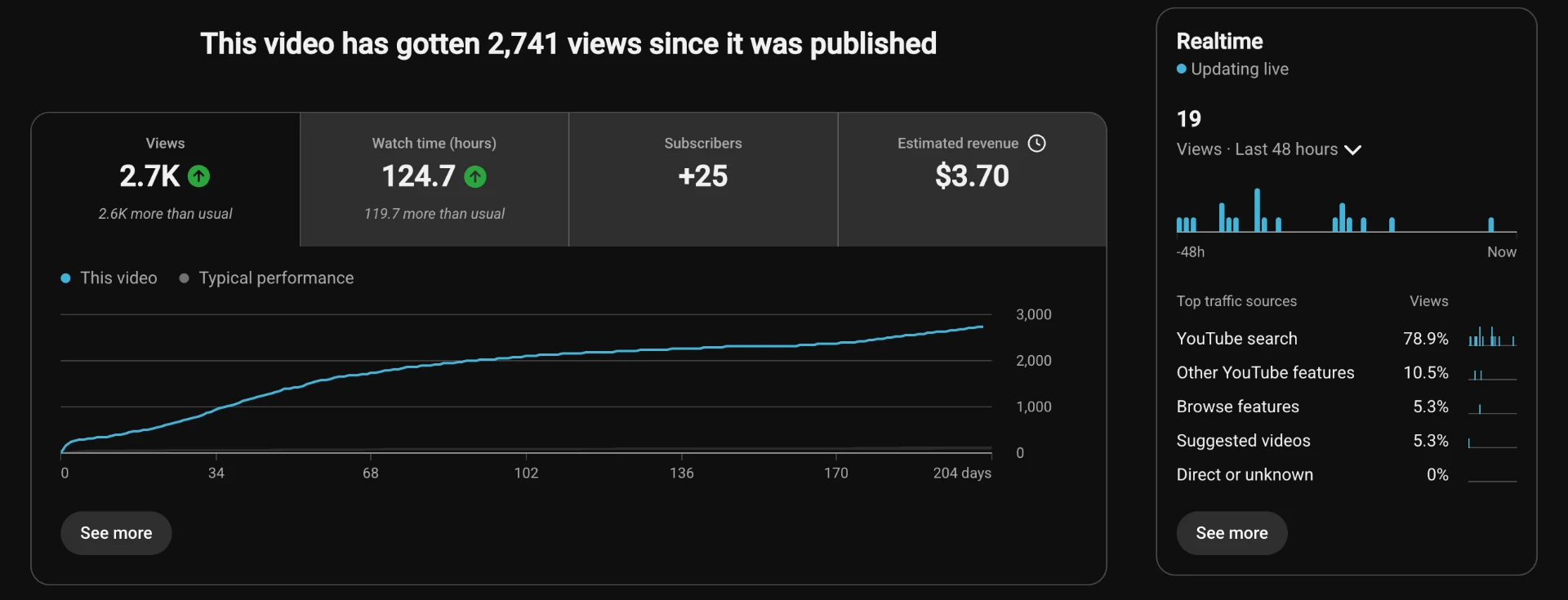
SEOBuddy — five search-led videos. Five product-feature videos positioned around buyer-intent YouTube searches, each answering a distinct query. Leads and revenue were deliberately not claimed because they could not be verified. Read the SEOBuddy case study.
GoHighLevel — $100K+ in affiliate revenue. A library of tutorial-led videos targeting how-to searches in the marketing-software niche, compounding over years into six figures of affiliate commissions. Read the GoHighLevel playbook.
Lovable — one SEO-driven video. A single search-targeted build video reported 161 visitors, 10 leads and 10 conversions through tracked links. Read the Lovable case study.
WAGHL — one buyer-intent video. A single video aimed at a high-intent search, documented with its funnel stages and evidence limits. Read the WAGHL case study.
Apify — long-form technical walkthrough. One deep video for a developer product reported 97 clicks, 17 referrals and one paying customer—proof that even niche technical products can convert from a single ranking video. Read the Apify breakdown.
These are different products, funnels and timeframes—not a controlled comparison. What they share is the method: problem keywords, proof-first scripting, and titles matched to real searches.
How to Measure YouTube SEO ROI for SaaS
Views are not the metric. For a SaaS channel, the chain is: search impressions → click-through rate → watch time → clicks to your site → trial or demo signups. YouTube Studio’s traffic sources report shows exactly which queries bring viewers; UTM-tagged links in descriptions and pinned comments connect those viewers to signups in your analytics.
| Stage | Metric | Where to check |
|---|---|---|
| Discovery | Search impressions, ranking position | YouTube Studio → Traffic sources → YouTube search |
| Packaging | Click-through rate from search | YouTube Studio → Reach |
| Content | Average view duration, retention curve | YouTube Studio → Engagement |
| Traffic | Clicks on UTM-tagged links | Your analytics, filtered by campaign |
| Revenue | Trials, activations, demos by video | Your analytics + CRM source fields |
Add a “How did you hear about us?” field to signup. Search-led video influence is chronically under-counted by last-click attribution, and self-reported answers will often credit YouTube when analytics does not.
How Long It Takes (and When to Stop)
For low-competition SaaS queries, videos often reach page one of YouTube search within two to six weeks; Google video results take longer and are less predictable. Give the 5-video framework ninety days. The decision rule: if videos earn search impressions and hold retention but do not convert, fix the landing page and call to action. If they earn no search impressions at all after ninety days, the keyword choices were wrong—re-research before recording more.
Stop or pause when your three best-intent queries are all won and marginal keywords have no buyer intent left. A SaaS channel is not a media business; ten videos that rank for buyer searches outperform a hundred that rank for nothing.
YouTube SEO for SaaS: FAQ
Can a small channel rank on YouTube?
Yes. For niche B2B queries, YouTube weighs relevance and retention far more than subscriber count. My client videos ranked from channels with a few hundred subscribers because the competition was outdated or off-target, not because of channel authority.
Shorts or long-form for SaaS SEO?
Long-form. Shorts are a discovery feed format—great for reach, weak for search. The queries that bring buyers (“how to do X”, “X vs Y”) are answered by five-to-fifteen-minute walkthroughs, and those are what rank in YouTube and Google search results.
Do you need expensive production?
No. A clear screen recording, a decent microphone and an honest walkthrough beat a cinematic brand film for search. Buyers searching a problem want the answer, not a trailer. Spend the budget on research and scripting instead.
Does YouTube SEO help with AI search?
Increasingly, yes. AI answer engines cite YouTube videos and their transcripts when answering how-to and comparison questions, and Google’s AI Overviews surface video results. A video that clearly answers a query in its first minute—with accurate titles and chapters—is the kind of source these systems prefer.
How many videos before results?
Five, if they are the right five. One video per distinct buyer intent gives you enough ranking data to know what works. Volume without keyword research just produces a library nobody finds.
How do you rank a YouTube video for a SaaS keyword?
Pick a problem keyword with buyer intent, confirm the current results are weak or outdated, script the video to prove the answer in the first 30 seconds, put the exact phrase in the title and first description lines, add chapters, and link it from a relevant page on your site. Then watch the search impressions report and iterate on the packaging, not the topic.
For the broader channel strategy around YouTube, read my SaaS video marketing guide and the SaaS demo video guide.
Choose your next topics from 30 YouTube video ideas for SaaS, study the teaching patterns in 15 SaaS YouTube channels and build paid-social openings with the 50 SaaS UGC hooks swipe file.
Share
Article footer · AI discovery
Want to explore this topic further?
Ask questions about this article or use it as a starting point for deeper research.
Want content that makes your SaaS product click?
Email promotions@fuelyourdigital.com or explore my content packages.