How to Market a Vibe-Coded App: Getting Your First 100 Users (2026)
Market a vibe-coded app with a first-buyer worksheet, demo plan, channel experiments, trust checklist and activation scorecard—not just a launch-day traffic spike.
Vibe coding made building cheap. You can describe an app in plain English to Lovable, Bolt or Cursor and have a working product by the weekend. What it didn't make cheap is attention. The same tools that let you ship in two days let thousands of other people ship in two days too, so "I built it" is no longer a story anyone clicks on.
This guide is the plan I'd follow to get the first 100 real users for an app built with AI. It leans heavily on video, because that's what I do for a living and because video is the fastest way to prove that a brand-new app actually works. I'll also show you what one search-led video did for Lovable itself.
The Short Answer
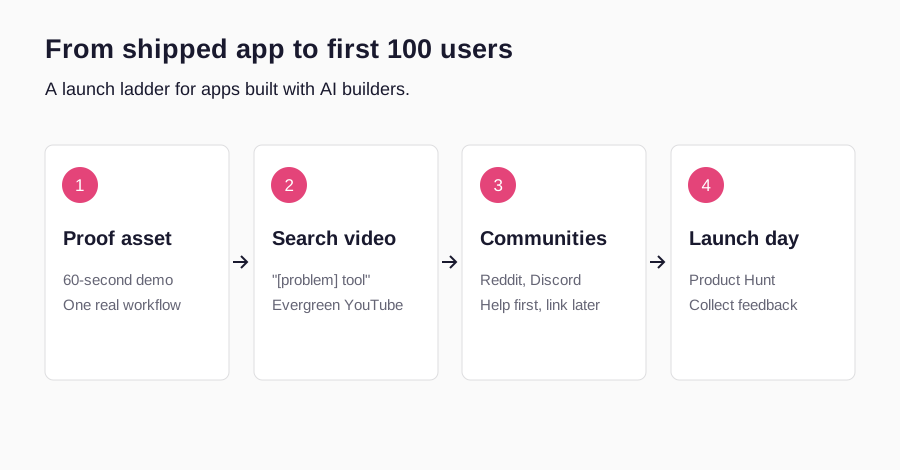
Why Most Vibe-Coded Apps Get Zero Users
A common marketing problem with AI-built apps is that nobody can tell what they are for. Reliability and distribution both need attention. When building takes a weekend, founders skip the part where they decide who the app is for and what single job it does. The result is a landing page that says "an AI-powered platform for productivity" and a launch post that gets eleven upvotes.
There are three specific traps. The first is marketing the tool instead of the outcome. People don't search for "app made with Lovable"; they search for "how to track invoices for freelancers". The second is launching too early to too many places at once, so feedback is thin and scattered. The third is invisible proof: screenshots of an empty dashboard don't convince anyone. A short video of the app doing the job does.
| Question | Builder answer | Answer that gets users |
|---|---|---|
| What is it? | An AI app built with Lovable | A tool that turns receipts into a monthly expense report |
| Who is it for? | Everyone | Freelancers who hate bookkeeping |
| Why now? | Because I could build it | Tax season is in six weeks |
| Proof | Feature list | A 60-second video of a real receipt becoming a report |
Before You Market Anything: Three Checks
Spend one afternoon on these. They make every channel below work better.
- One sentence. Write what the app does for one type of person in under 15 words. If you can't, the marketing can't either.
- First value in under two minutes. A new user should reach the moment where the app is useful quickly. Vibe-coded apps often have long empty states; add sample data or a guided first step.
- Basic tracking. Know how many people sign up and how many complete the core action. Without that you can't tell which channel brought real users.
Launch-readiness checklist
6 items still to confirm.
1. Record a 60-Second Demo Video First
Your demo video is the single asset every other channel reuses. It goes on your landing page, into your Reddit replies, your Product Hunt gallery, your X posts and your outreach emails. For a new app, it does one thing nothing else can: it proves the thing exists and works.
Keep the structure simple. Open on the problem in one line. Show the app solving it with real data, not a mockup. End on the result and one call to action. Skip the intro animation, skip the tour of every feature. If you want a deeper framework, the SaaS demo video covers scripting and pacing, and app promo videos covers the shorter social cut.
- 1
0–5s: The problem
"Doing X manually takes an hour every week."
- 2
5–40s: The app doing it
Real screen recording, real data, one workflow only.
- 3
40–55s: The result
Show the finished output the viewer wants.
- 4
55–60s: One next step
"Try it free at…" — nothing else.
2. Publish YouTube Videos That Answer a Search
This is the channel most vibe coders skip, and it's the one that keeps working after launch week. YouTube is a search engine. People type "how to [do the task]" and "best tool for [task]" into it every day. A video that answers that question, with your app as the method, collects viewers who already have the problem.
Pick three searches your ideal user would type. Good patterns are "how to [task] without [pain]", "[task] tool for [audience]" and "[competitor] alternative". Make one useful tutorial per search. Put the search phrase in the title, say it in the first sentence, add chapters, and put your link at the top of the description. YouTube's own explanation of how search works is worth five minutes: relevance and viewer satisfaction matter more than tricks.
I wrote a full YouTube SEO for SaaS playbook if you want the details. The key is honesty: show the real build or the real workflow, including the bits that take a second try. That sets expectations and attracts users who stay.
| Search pattern | Example | Why it works |
|---|---|---|
| How to [task] | How to turn receipts into an expense report | Viewer has the problem today |
| [Task] tool for [audience] | Expense tool for freelancers | Viewer is shopping |
| [Competitor] alternative | Cheaper alternative to [big app] | Viewer is ready to switch |
| Build-along | I built a [type] app with AI in a day | Attracts other builders and early adopters |
3. Reddit and Communities: Help First, Link Later
Founder discussions about marketing AI-built apps appear in communities such as Reddit; those discussions can help you learn the language people use for the problem. It works, but only if you behave like a member. Find the subreddits where your users complain about the problem, not just the ones about startups. Answer questions properly. Mention your app only when it genuinely solves what someone asked, and say you built it.
Read each community's rules before posting; many ban self-promotion outright, and Reddit's content policy applies everywhere. A useful pattern is the "what I learned" post: share the problem, what you tried, what worked, and put the app link in a comment only if people ask. Paste your 60-second demo as proof.
- Where to look: subreddits for your user's job, niche Discord servers, Slack groups, Facebook groups and Indie Hackers.
- What to post: solutions, honest build stories, and short demos that answer a specific question.
- What to track: replies and sign-ups from each thread, so you know which communities are worth your time.
4. Build in Public on X and LinkedIn
Building in public works especially well for vibe-coded apps because the build itself is interesting. Post short clips of a feature going from prompt to working screen, share real numbers, and ask your followers what to build next. You're not chasing virality; you're building a small group of people who feel invested and will try the app on launch day.
Pair it with founder-led content: you explaining why the problem matters to you. My guide to founder-led marketing goes deeper on this.
5. Launch on Product Hunt (When You're Ready)
Product Hunt is a launch day, not a strategy. It's great for a spike of early adopters, feedback and a backlink, but it rarely brings your hundredth user on its own. Launch once you have a handful of real users, a demo video for the gallery and a clear one-line tagline. Product Hunt's launch guide covers the mechanics.
On the day, reply to every comment, post your demo, and tell your build-in-public audience and community friends. Afterwards, email everyone who signed up and ask one question: what almost stopped you from trying it?
6. Creators and UGC
Once you know which message works, a creator can put it in front of an audience you don't have yet. For AI apps, the best-performing creator content is usually a tutorial or a problem-solution video, not a polished ad. A creator showing your app solving their own problem borrows their trust for your product.
You don't need a big budget. One well-briefed video can be reused as a YouTube tutorial, a short-form clip and an ad. I cover formats and briefs in UGC for AI apps, and what to expect to pay in SaaS UGC pricing. If you're weighing a sponsored YouTube video, see YouTube sponsorship rates for SaaS.
7. Directories, Comparison Pages and SEO
List the app in relevant AI-tool and SaaS directories, and in the showcase of the builder you used if it has one. Each listing is small, but together they bring steady trickle traffic and help search engines find you. Then write two or three pages on your own site that match searches with buying intent: "[your category] for [audience]" and "[competitor] alternative". Embed your YouTube videos on them so one asset works in two places.
| Channel | Speed | Lasts | Effort | Best for |
|---|---|---|---|---|
| Demo video | Fast | Reused everywhere | Low | Proof on every channel |
| YouTube search | Slow start | Months to years | Medium | Evergreen, high-intent users |
| Reddit / communities | Fast | Days | Medium | First feedback and users |
| Build in public | Medium | Grows over time | Ongoing | Launch-day supporters |
| Product Hunt | One day | A week | Medium | Spike, feedback, backlink |
| Creators / UGC | Fast | Reusable | Budget | Reaching new audiences |
| Directories / SEO | Slow | Long | Low–medium | Steady discovery |
Proof: What One Search-Led Video Did for Lovable
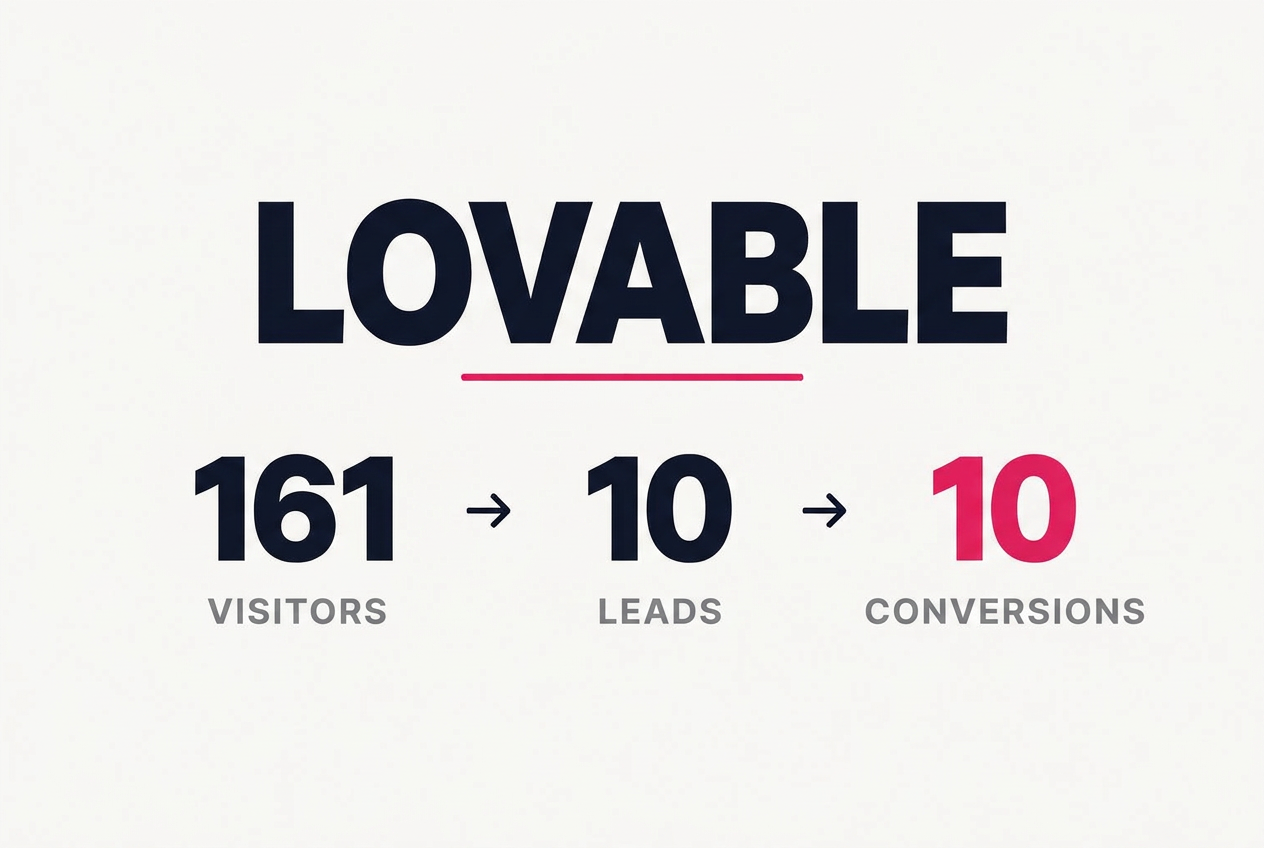
Lovable is one of the tools people use to vibe-code apps, and I made a search-led YouTube tutorial about it. According to my affiliate dashboard, that link brought 161 visitors, 10 leads and 10 conversions. It's a small sample and a link-level summary, not a controlled experiment, but it shows the pattern this guide is built on: fewer visitors, better ones. People who find you through a search for their problem already want the result.
The full breakdown is in the Lovable case study, with the evidence limits spelled out.
A 30-Day Plan for Your First 100 Users
- 1
Days 1–3: Sharpen
Write the one-sentence promise, fix the first two minutes, add tracking.
- 2
Days 4–7: Record
Make the 60-second demo and one YouTube tutorial for your best search.
- 3
Days 8–20: Help
Answer questions in three communities daily; post one build update a day.
- 4
Days 21–24: Launch
Product Hunt with your demo; email every early user personally.
- 5
Days 25–30: Double down
Look at activated users by channel; make the second video for the winner.
A hundred users rarely come from one big moment. They come from a few dozen small, honest touches in places where your users already hang out, all pointing to a video that shows the app doing its job.
Mistakes to Avoid
- Leading with "built with AI". Users care about the result. Mention the build story to builders, not to customers.
- Launching everywhere on day one. You lose the chance to fix what the first users tell you.
- Buying fake traffic or upvotes. It skews your data and can get you banned from the platforms you need.
- Counting visits instead of activations. A hundred sign-ups who never used the app aren't a hundred users.
- Hiding the real product. Mockups and hype thumbnails attract people who leave. Show the actual screen.
Choose Your First Buyer Before Choosing a Channel
A vibe-coded app is software built with substantial AI assistance; that describes how it was made, not why somebody should use it. Your first market should be a reachable group with a recurring task, an observable result, and a reasonable path to trying the product. A generic AI productivity app has to compete for attention across many unrelated jobs. An app that turns a freelance designer’s approved project notes into a client handoff checklist has a clearer demonstration and a more specific place to find users. This is a hypothetical positioning example, not a product recommendation.
Start with five conversations, not five new features. Ask people to walk through the last time they did the task. What triggered it? Which file or message did they start with? Where did they get stuck? What did they use instead? Avoid asking whether they like your idea: polite encouragement is not evidence of demand. Permission to observe the real process is more useful than a compliment on the interface.
| Question | Too broad | Useful first hypothesis |
|---|---|---|
| Buyer | Freelancers | Independent designers handing off website projects |
| Trigger | Wants productivity | Client has approved the final design |
| Alternative | Other apps | Checklist copied from the previous project |
| Value event | Creates an account | Produces and checks a handoff checklist |
| Reachable location | Social media | A design community with handoff questions |
| Boundary | Does everything | Does not verify contractual obligations |
Write down what would disprove the hypothesis. If people already have a good template and do not find handoffs painful, a prettier checklist is not enough. If the real frustration is collecting assets from clients, your marketing may be pointing at the wrong job. Fix the proposition before buying attention.
For a broader positioning process, use the SaaS product marketing guide. Keep the first experiment narrower than the eventual product vision.
Make an AI-Built App Safe and Believable to Try
Fast building creates a marketing risk: a convincing interface can exist before the underlying workflow is reliable. Test the exact signup-to-output journey you will show in the demo. Try invalid inputs, an empty account, a slow connection, and the browser your customer actually uses. Check that a visitor can understand pricing, contact support, and remove their information through the process your product genuinely supports. Do not invent privacy or security assurances just to make the landing page reassuring.
Use a sample workspace to demonstrate the result before asking for real customer data. A visible sample lowers evaluation effort, but label it clearly. If your tutorial uses prepared data, explain that preparation. If AI output needs review, show the review. A short honest limitation often does more for credibility than an unsupported claim such as “fully autonomous” or “enterprise secure.”
First-user trust checks
6 items still to confirm.
Google’s people-first content guidance is also a useful filter for your marketing pages: publish what helps a real user decide, not dozens of thin keyword variations.
Run One Distribution Experiment You Can Learn From
Give each channel a specific job. A relevant community thread can tell you whether the problem resonates. A tutorial can help people evaluate the workflow. A launch platform can bring feedback from early adopters. These are different audiences; combining their visits into one total makes the result harder to interpret. For your first month, choose one immediate-feedback channel and one reusable proof asset, rather than trying to maintain six channels at once.
For the hypothetical handoff app, the experiment might be a practical community answer about what belongs in a client handoff, with a disclosed sample demo where community rules allow. The tutorial can answer “how to create a website client handoff checklist.” The destination should show that same task and offer the same sample, not send users to a generic homepage with unrelated features. This continuity is more important than making every asset look identical.
| Field | Record before launch | Record after launch |
|---|---|---|
| Hypothesis | Designers struggle with repeated handoff preparation | Did replies describe this problem? |
| Placement | One relevant thread or tutorial | Exact public URL and date |
| Asset | One sample workflow demonstration | Version of video and landing page |
| Primary outcome | Checked handoff checklist completed | Number of unique users reaching it |
| Cost | Hours plus any cash spend | Actual time, spend, and support effort |
| Decision | Fix, repeat, or stop criteria | What evidence supports the next step? |
A simple weekly funnel should separate visits, signups, first completed tasks, and repeat use. If visitors understand the pitch but abandon signup, inspect the signup path. If they create accounts but never complete the task, fix onboarding. If they complete the task once and never return, investigate whether the problem repeats often enough. More traffic is not the default solution to every drop-off.
For illustration only: channel A sends 100 visitors, 20 signups, and 4 completed first tasks; channel B sends 30 visitors, 10 signups, and 6 completed first tasks. B has fewer visits but more first-value users. That does not prove B is scalable or causally superior: the audiences, effort, and time period may differ. It does show why visits alone are an inadequate decision metric.
When the product is ready for outside creators, use how to get YouTubers to promote your SaaS and agree scope using the YouTube sponsorship guide.
Build Search Pages Around Real Product Questions
For a new app, the first useful search page is often a task guide rather than a competitive category page. Explain the task, give a working example, show the relevant output, and make requirements explicit. A page about creating a handoff checklist should include an actual example checklist; it should not spend most of its space describing the founder’s AI-building journey. Use a clear title, a stable URL, descriptive headings, and links from relevant pages on your own site.
Comparison pages need an honest comparison. Use current documentation and compare the same task under the same conditions. Name where the established alternative is stronger. Do not generate hundreds of “[competitor] alternative” pages that differ only in the product name. If you cannot add first-hand product detail or a useful decision framework, the page is not ready to publish.
“Built with Lovable” can be a useful acquisition angle when your buyer is another builder. It is usually weaker when the customer simply needs a finished business task. Keep the build story and the customer task as distinct content angles so you can see which audience each attracts. Search demand for new vocabulary is uncertain; do not interpret a missing keyword estimate as proof that a topic is easy to rank for.
For browser-based products, the Chrome extension marketing playbook adds the installation and permission steps that this general app plan does not cover.
If you built with Lovable, its SEO and AI discovery documentation explains crawler-readable pages, metadata, canonical URLs, sitemaps and Search Console checks. Verify the published page rather than assuming a successful preview means Google has indexed it. These checks make discovery possible; they do not guarantee rankings.
Frequently Asked Questions
Is marketing a vibe-coded app different from marketing any other app?
The principles are the same. The difference is speed: you can ship faster than you can find users, so the risk is building ten features nobody asked for. Spend more of your time on distribution than you think you need to.
Should I say my app was built with Lovable, Bolt or Cursor?
To builders and on build-in-public posts, yes; it's an interesting story. To customers, it's usually irrelevant. They want to know what the app does for them and whether it's reliable.
What's the single best first channel?
A demo video, because every other channel needs it. After that, communities for fast feedback and YouTube search for users who keep arriving.
Do I need a marketing budget?
Not for the first 100 users. Everything except creator content can be done with time. Once one message clearly works, a small budget for a creator video or ads helps you reach more people with it.
How long does it take to get 100 users?
It depends on the problem and the audience. With a focused promise and daily community work, many founders see the first users within weeks; YouTube search usually takes longer to start but keeps going.
Share
Article footer · AI discovery
Want to explore this topic further?
Ask questions about this article or use it as a starting point for deeper research.
Want content that makes your SaaS product click?
Email promotions@fuelyourdigital.com or explore my content packages.