How to Market a Chrome Extension: 9 Ways to Get Your First 1,000 Users
A complete Chrome extension marketing plan: store listings, permission trust, demos, YouTube outreach, activation measurement and a first-user campaign checklist.

Chrome extensions are small, useful and almost invisible. Someone has to know your extension exists, trust it enough to grant permissions, install it, pin it and then remember to use it. Most marketing advice stops at "post on Product Hunt". This guide covers the full path, with an angle most guides skip entirely: video.
I make demo and tutorial videos for software products, and I've written before about UGC for Chrome extensions. This is the broader playbook: nine ways to get your first 1,000 users, in the order I'd do them.
The Short Answer
Why Chrome Extensions Are Hard to Market
| Challenge | Why it matters | What fixes it |
|---|---|---|
| Trust | Permissions like "read and change data on all sites" scare people | Explain permissions plainly; show what the extension actually does |
| Invisibility | After install, the icon hides in the puzzle menu | Prompt users to pin it; deliver value on first use |
| Discovery | The Web Store is crowded and search is literal | Use the words people type in your title and description |
| Hard to explain | Screenshots of a tiny popup don't convey much | Video of the extension working on a real page |
1. Fix Your Chrome Web Store Listing
The Web Store has its own search, and it's surprisingly literal. If people search "tab manager" and your title says "Focusly – Productivity Reimagined", you're harder to find. Put the plain description of what the extension does in the title or short summary, while staying within Google's rules against keyword stuffing.
Google publishes its own best practices for Web Store listings and program policies. Read both; a rejected or delisted extension markets nothing.
Web Store listing checklist
7 items still to confirm.
2. Make a Demo Video and GIFs
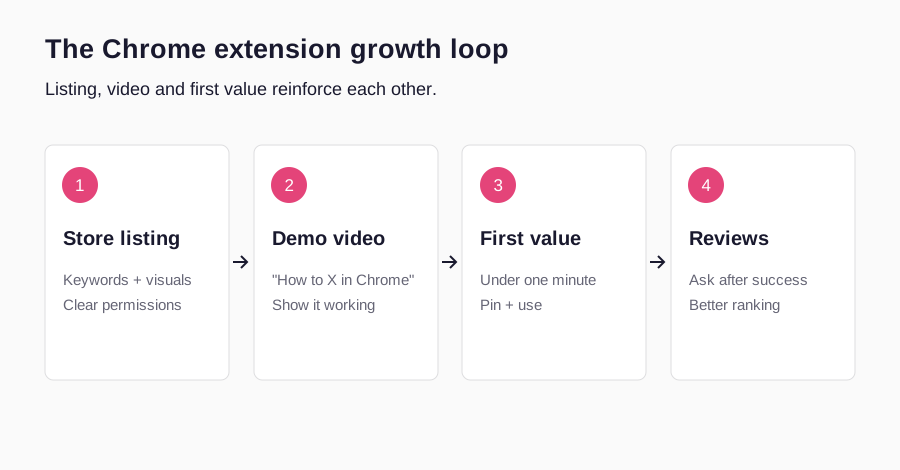
An extension is a behaviour: you click, something happens on the page. That's very hard to show in a screenshot and very easy to show in a 30-second video. Record the extension on a real website doing its one job, from click to result. Cut a 5–10 second GIF of the key moment for your landing page, Reddit replies and X posts.
- Show it on a familiar site. Gmail, YouTube, LinkedIn or Google Docs make the use case instantly clear.
- Show the install-to-value moment. Click install, pin, use. It removes the fear of the unknown.
- Show the permission moment honestly. Then explain what happens with the data.
My SaaS demo video guide covers scripting; the same structure works for extensions.
3. YouTube Videos Built Around "How to [Task] in Chrome"
This is the biggest gap in every "how to market a Chrome extension" guide I've read. People don't search YouTube for extensions. They search for tasks: "how to save all open tabs in Chrome", "how to download a video from a website", "how to translate a page in Chrome". A tutorial that answers that search, with your extension as the solution, finds users with the exact problem.
| Search pattern | Example | Intent |
|---|---|---|
| How to [task] in Chrome | How to save all tabs in Chrome | Has the problem right now |
| Best Chrome extension for [task] | Best Chrome extension for note-taking | Shopping for a tool |
| [Website] + [task] | How to download LinkedIn comments | Very specific, high intent |
| [Competitor] alternative | Free alternative to [extension] | Ready to switch |
Title the video with the search, answer it in the first sentence, add chapters and put the Web Store link first in the description. These videos also tend to appear in Google results and AI answers; see can YouTube get your SaaS recommended by ChatGPT. My YouTube SEO for SaaS guide has the full method.
4. Creators and UGC
A creator showing your extension solving their own problem does two things at once: reach and trust. The second matters more for extensions, because a real person using it on camera answers the silent question "is this safe?"
Brief creators on one workflow, not every feature, and ask them to show the permission prompt and explain it. I go into formats, scripts and what to avoid in UGC for Chrome extensions; for pricing, see SaaS UGC pricing.
5. Reddit and Communities
Reddit and other communities can surface people already asking about the task your extension solves. The rule is the same as anywhere: help first. Find threads where people ask for the task your extension does, answer properly, and mention your extension as one option with a disclosure that you built it. A GIF of it working is more persuasive than any description.
Look beyond startup subreddits: communities for the job your user does (marketers, students, recruiters, developers) are where the demand is. Respect each community's rules and Reddit's content policy.
6. A Landing Page That Ranks
Your Web Store listing doesn't rank well in Google for broad searches. A simple landing page on your own site can. Build it around the task ("Save and restore Chrome tabs in one click"), embed your demo video, explain permissions and privacy, and add an FAQ. Then add a few pages for specific use cases and competitor alternatives. Each one is a door from Google search into your install button.
7. Launch Platforms
Product Hunt, Hacker News (Show HN), Indie Hackers and extension directories each give you a burst of early users and feedback. Launch once your listing, demo video and onboarding are solid, so the burst turns into reviews and retained users rather than uninstalls. Product Hunt's launch guide is a good checklist.
8. Reviews and Ratings
Ratings shape both Web Store ranking and whether people install. Ask for a review at the right moment: just after the user succeeds, not on install and not with a popup on every page. A small, dismissible prompt after demonstrated value is a reasonable starting hypothesis; test the timing and follow current store policy. Reply to every review, especially negative ones, and fix what they mention.
9. Onboarding and Referrals
Installs that never turn into use are wasted marketing. Open a welcome page after install that asks the user to pin the extension and walks them through the first use. Then make sharing natural: an output people send to others (a link, a summary, an export) is a referral engine built into the product.
| Channel | Effort | Speed | Lasts | Best for |
|---|---|---|---|---|
| Web Store listing | Low | Weeks | Long | Store search discovery |
| Demo video / GIFs | Low | Immediate | Reused everywhere | Trust and clarity |
| YouTube tutorials | Medium | Slow start | Months to years | High-intent users |
| Creators / UGC | Budget | Fast | Reusable | New audiences, trust |
| Reddit / communities | Medium | Fast | Days | First 100 users |
| Landing pages | Medium | Slow | Long | Google search |
| Launch platforms | Medium | One day | A week | Spike and feedback |
| Reviews | Low | Ongoing | Compounds | Ranking and conversion |
| Onboarding / referrals | Medium | Ongoing | Compounds | Retention and word of mouth |
Why Buying Installs Backfires
Services selling Chrome extension installs or reviews promise a quick boost in ranking. In practice they hurt you. Bought installs don't use the extension, so your engagement looks terrible. Fake reviews break Google's Web Store policies and can get the extension removed. And your data becomes useless: you can't tell which real channel is working.
A Plan for Your First 1,000 Users
- 1
Week 1: Foundations
Rewrite the listing, record a 30-second demo and GIF, add a pin-it welcome page.
- 2
Weeks 2–3: First 100
Help in five communities; share the GIF where it answers a question.
- 3
Week 4: Launch
Product Hunt and Show HN with the demo; ask happy users for reviews.
- 4
Weeks 5–8: Search
Publish three YouTube "how to in Chrome" tutorials and matching landing pages.
- 5
Weeks 9–12: Scale
Brief creators on the message that worked; add referral sharing.
Turn Permission Questions Into an Honest Trust Page
An extension runs in a context where users are already working: email, documents, browsing history, or another website. That makes a permission prompt a real evaluation step, not a nuisance to hide. Build a plain-language explanation that matches the current manifest and actual data behavior. Name the sites or information the extension needs, why it needs them, when access occurs, and whether anything leaves the device. A marketer cannot determine those facts from a screenshot of the popup; verify them with the developer and documented product behavior.
Permission minimization is also a product decision. Ask whether the same useful workflow can work with narrower host access or an optional permission. Do not promise that all broad permissions can be removed; some functionality depends on them. Explain the trade-off rather than claiming your extension is safe simply because a creator installed it.
Use Chrome’s official permission warning guidance and user privacy policies as the starting references. The listing, product disclosures, privacy policy and video should describe the same behavior.
Permission-aware marketing review
6 items still to confirm.
For a creator brief, replace “tell viewers it is secure” with “show the installation prompt and explain this documented permission in plain language.” The second instruction is verifiable. The first asks for an assurance that an ordinary demo cannot establish.
Improve Store Conversion Without Guessing the Algorithm
Chrome Web Store search and Google web search are different discovery surfaces. A store visitor may already know the category and compare screenshots; a Google visitor may need a task explained before they even think about an extension. Write the listing to clarify the job and the landing page to answer the broader task. Avoid treating repetition of a keyword as a substitute for clarity.
Use the first screenshot to show a completed task with enough context to interpret it. A popup sitting over a blank page is usually less informative than a popup and the changed page together. Add captions that explain the result rather than naming buttons. For a hypothetical tab organizer, “Restore this research session” tells a useful story; “Dashboard” does not. Make every screenshot represent current functionality, and label illustrative sample data.
| Element | One useful test | Outcome to inspect |
|---|---|---|
| Summary | Describe the task in literal language | Install behavior in a comparable period |
| First screenshot | Show one recognizable result | Listing-to-install trend and visitor feedback |
| Video | Show install, first action and result | Confusion and first-use completion |
| Permissions explanation | Clarify a verified reason for access | Support questions and abandoned evaluation |
| Welcome page | Guide the user into one useful task | First task completed, not page views |
Change one important element at a time when practical, and record dates, traffic sources and product releases. A conversion increase during a launch spike may reflect a different audience, not a better screenshot. If the store analytics available to your account cannot measure a step, leave that step unknown instead of inventing a conversion rate. Google’s listing guidance is a compliance and quality reference, not a promise of a particular ranking formula.
Keep reviews honest. Ask for an unbiased review after someone has experienced the product, and follow the current store policies. Do not pay for positive ratings, require a review to unlock functionality, or send unhappy users down a path intended to suppress their feedback. Negative reviews can identify compatibility problems that no amount of marketing will fix.
Measure Installs, First Value and Repeat Use Separately
An install is not the same as an active user. A person can install an extension and never pin it, never invoke it, or discover that it does not work on the site they needed. Define a first-value event around the actual task: a session saved and restored, a page annotation exported, or a supported message processed. Those are illustrative examples; the event for your extension should reflect its real value.
| Stage | What it tells you | Typical next question |
|---|---|---|
| Landing-page visit | Someone encountered the proposition | Did the promise match the referral? |
| Store visit | Someone is evaluating installation | Are permissions and supported sites clear? |
| Install | Someone accepted the store flow | Can they find and open the extension? |
| First successful task | The extension delivered initial value | Did setup or compatibility block others? |
| Repeat successful use | The use case recurs | Which users find ongoing value? |
| Uninstall or complaint | There may be a mismatch or failure | What changed, and what can be improved? |
You may not be able to join every step across domains and devices. Use aggregated, privacy-respecting measurements, document attribution limits, and obtain consent where required. Do not collect browsing histories or page content merely to improve marketing reports. Measurement should answer a defined question with the least data needed, not turn a trust-sensitive product into a surveillance tool.
For illustration, a launch that creates 200 installs but 20 completed first tasks may be less useful than a tutorial that creates 60 installs and 30 completed tasks. These invented numbers do not predict results, and they say nothing about repeat use until that is measured. They show why scaling install volume before solving activation can waste both money and user trust.
For the video side of that first-value journey, use UGC for Chrome extensions and the SaaS script template.
A Creator Campaign Built Around One Browser Task
Give a creator a supported browser version, a safe test account, a short list of supported sites, the installation URL, and a documented permission explanation. Ask them to reproduce the task before recording. A creator who can explain why one step fails on an unsupported page is more helpful than a video that silently edits away the limitation.
A hypothetical tab organizer brief could show a student opening a research session, saving the tab group, closing it, and restoring it later. The opening line should describe losing research context, not announce “the best Chrome extension.” The proof is the restored session. The boundary might be that some logged-in pages still need a fresh sign-in. Only include that boundary if it is true for the product being demonstrated.
- 1
Recognize the task
Show the specific browsing problem without exposing personal tabs.
- 2
Install honestly
Display the real listing and permission prompt.
- 3
Find the extension
Show how to access or pin it in the supported browser.
- 4
Do one job
Complete one clear task on a supported page.
- 5
Inspect the result
Hold the output on screen and state a relevant limitation.
- 6
Offer the matching next step
Link to the correct store listing and current help page.
When paying for a creator’s channel publication, specify the tutorial title, link placement and maintenance expectations. The same footage can support a landing-page clip only if the usage agreement allows it; ad usage is a separate question. Explain whether the campaign goal is qualified installs, completed tasks or paid upgrades before deciding that a view count is a success.
Plan the outreach with how to get YouTubers to promote your SaaS and compare quotes in YouTube sponsorship rates for SaaS.
What to Fix Before Scaling Beyond the First Users
Segment recurring complaints by the task and environment, not just the acquisition channel. If one popular site redesign breaks the extension, pause campaigns promising that workflow until it is repaired. If people install expecting a feature that exists only on a paid plan, clarify the plan before the click. If users cannot find the icon, improve the welcome flow before paying for more installs.
Add use-case pages only when the use cases are real and distinct. A guide for saving a research session and a guide for reopening a client workspace can each be useful if they contain relevant examples and supported steps. Dozens of near-identical pages naming different professions are unlikely to help users. Link each guide to the appropriate demo and listing, and maintain it when the extension changes.
Retained use should guide referrals and paid acquisition. A natural shareable output can introduce the product to another person, but not every extension has one and not every workflow should be shared. Never expose private page content or add referral tracking without a legitimate purpose and appropriate safeguards. A small trusted extension with clear boundaries has a stronger foundation than one inflated by purchased installs.
The vibe-coded app marketing guide covers the broader first-buyer experiment when your extension was built with AI. The browser-specific installation journey remains the extra step you must solve here.
Chrome’s official metrics documentation explicitly distinguishes installation statistics from actual activity: the Users statistics capture installations, not whether those users are active. Use product-side first-value measurements only where appropriate and privacy-respecting. Its discovery guidance describes multiple considerations rather than a single review threshold or keyword trick.
Frequently Asked Questions
How do I get the first users for a Chrome extension?
Help people in communities where the problem is discussed, with a short GIF showing the extension solving it, and ask friends and early users for honest reviews.
How do I rank in the Chrome Web Store?
Use the words people search in your name and summary, keep a strong rating, and keep users engaged. Follow Google's listing best practices rather than stuffing keywords.
Should I buy Chrome extension installs?
No. Fake installs and reviews don't use your extension, distort your data and risk removal under Web Store policies.
Does YouTube work for Chrome extensions?
Yes, if the video answers a task search like "how to [task] in Chrome". It brings users with the exact problem, and those videos keep working for months.
Are paid ads worth it for extensions?
They can work once you know which message converts, but test organic channels first. Free extensions especially need strong retention before ads make sense.
Share
Article footer · AI discovery
Want to explore this topic further?
Ask questions about this article or use it as a starting point for deeper research.
Want content that makes your SaaS product click?
Email promotions@fuelyourdigital.com or explore my content packages.