Silent UGC: The No-Voiceover App Ad Format, Explained (2026 Guide + Free Claude Skill)
What silent UGC is, why it works for apps, how to build one second by second, where AI actors help and where they cause trouble, plus a free downloadable Claude Code skill for making variations.
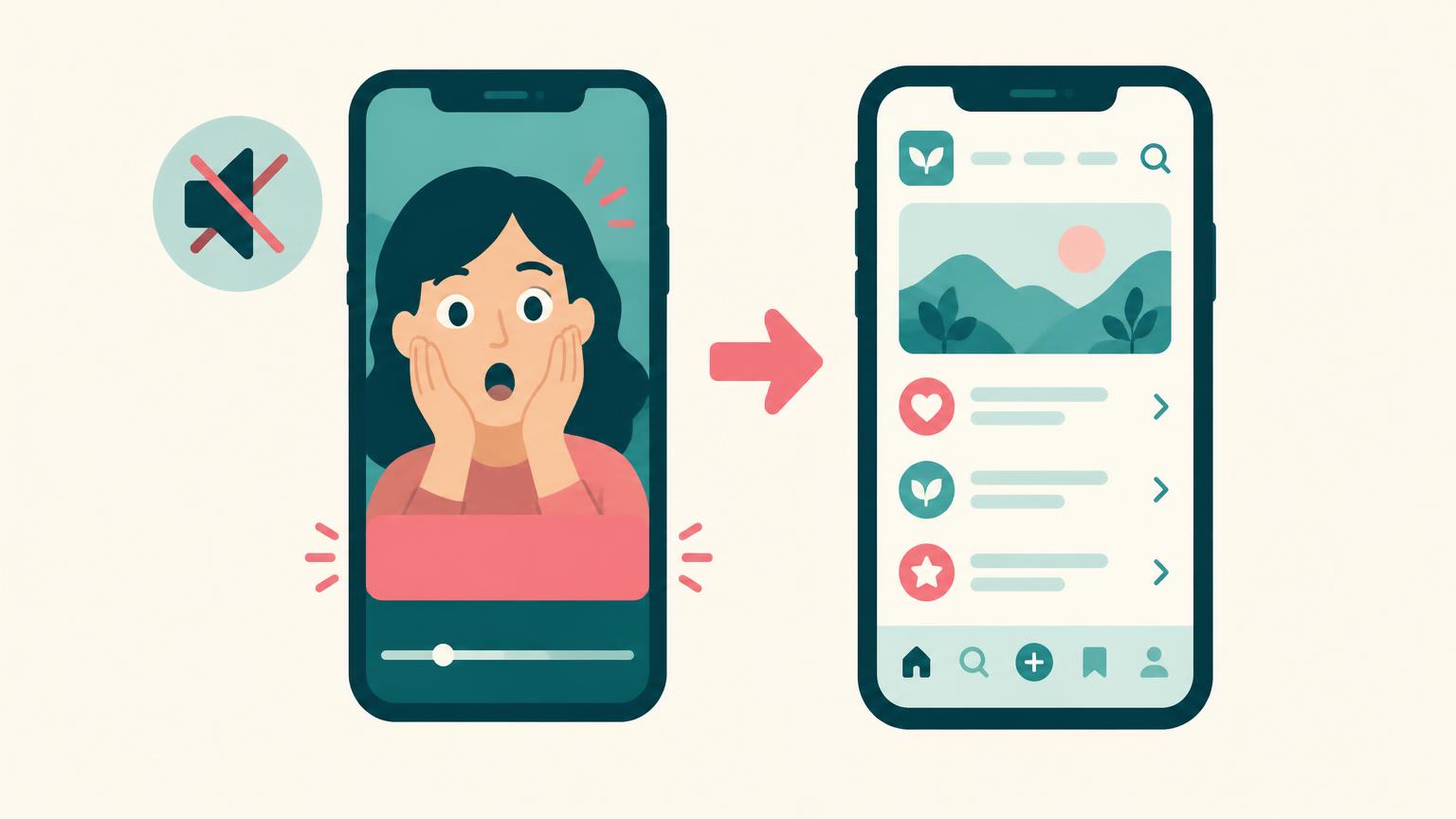
Scroll TikTok or Reels for five minutes and you'll see one ad shape over and over: a person reacting to something off screen, one line of text on their face, then a hard cut to an app's screen. Nobody speaks. That's silent UGC, and in 2026 it's one of the cheapest formats app founders can test.
I make UGC and spokesperson videos for SaaS and AI products, so I'll be straight about where I sit: I'm usually the person talking to camera, which is the opposite of this format. That's useful here. I'll explain when silent UGC is the right call, when a talking creator wins, and how to make either one honestly.
What Is Silent UGC?
The term spread in 2026 largely through creator and builder Jason Lee, whose video on the method passed 129,000 views within weeks of posting and who published a free Claude Code skill to automate it (video page, skill repository). The idea itself is older: it's the classic TikTok "reaction plus caption" meme applied to app ads.
Silent UGC isn't the same as AI UGC. You can shoot it with a real person on a phone in ten minutes. AI just makes producing dozens of variations cheaper.
Why Silent UGC Works for Apps
- Sound-off by default. Many people scroll muted. A format that never relied on audio doesn't lose anything when muted.
- The face stops the scroll, the text does the selling. A real-looking human reaction reads as native content rather than an ad in the first second.
- The demo does the persuading. Instead of a creator describing the product, viewers see it work. For apps with a visible result, that's more convincing than claims.
- Cheap variation. The demo clip is reused. You only change the text line, and sometimes the face. That makes it ideal for finding a winning angle before spending on bigger productions.
- No script to perform. Without lines, you avoid the stiff delivery that sinks a lot of low-budget UGC.
What the format can't do: explain anything complicated, build trust through a voice, or show a real customer's story. Those jobs still belong to talking UGC, testimonials and demos.
Anatomy of a Silent UGC Ad, Second by Second
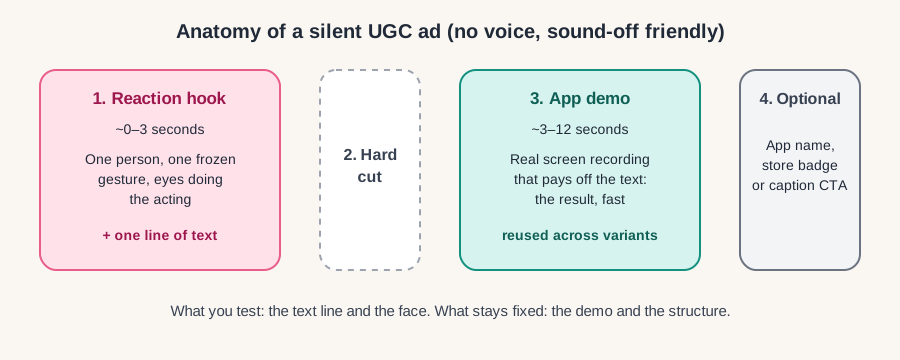
| Time | On screen | Job | Tip |
|---|---|---|---|
| 0.0–0.5s | Close-up face, already mid-reaction | Stop the scroll | Start on the reaction, not before it. No intro. |
| 0.5–3s | Same shot, one text line over the face | Name the situation or promise | Keep it under ~12 words, readable in one glance |
| ~3s | Hard cut | Signal the payoff | No transitions; a jump cut feels native |
| 3–10s | Screen recording of the app | Prove the text line | Show the result in the first second of the demo |
| 10–12s | Optional app name or end frame | Make it findable | Put the CTA in the caption if the end card hurts watch time |
The performance matters more than people expect. The skill's author reports that his frame-by-frame review of winning hooks found that most use one held gesture with small eye movements at low intensity, not a big emotional arc, and that overacting is what makes AI versions look fake (silent-ugc README). That matches what I see with human creators: subtle reads as real.
Watch the Method
Jason Lee's walkthrough covers the format, the tools, preparing references and the cost per video. It's sponsored by Arcads, which he discloses, so treat cost claims as the creator's own figures.
How these $100K/mo apps actually get users (New Strategy) — Jason Lee
Loading this video connects to www.youtube-nocookie.com, which may collect your IP address and use cookies.
Which Products Silent UGC Suits (and Which It Doesn't)
| Good fit | Weak fit |
|---|---|
| Consumer apps with an instant visual result (photo, fitness, study, budgeting) | B2B tools whose value appears after setup or integration |
| AI tools where input → output fits in a few seconds | Products that need explanation of pricing, security or workflow |
| Apps solving a relatable, slightly embarrassing problem | Regulated claims (health, finance) that need careful wording |
| Products with many audience angles to test | Brands that rely on a known founder's voice and trust |
If your product sits on the right side, a talking format usually works better. See my guides to UGC for SaaS products, LinkedIn video ads for SaaS and TikTok marketing for SaaS.
Writing the Text Line
The text line is the entire script, so it carries the angle. These patterns work well with a reaction shot. Examples are illustrative, not tested claims:
| Pattern | Example | Reaction that fits |
|---|---|---|
| Discovery | "when you find out there's an app that plans your meals from what's in your fridge" | Slow look up, small smile |
| Confession | "me pretending I didn't use an app to fix this" | Side glance, held smirk |
| Pain point | "POV: 2am and the essay is due at 9" | Blank stare at screen |
| Someone else's reaction | "my roommate seeing my screen time drop by half" | Raised eyebrows |
| Before/after | "how my budget looked before this app" | Wince, then cut |
Rules: write like a caption, not an ad; one idea per line; make sure the demo literally shows what the text says. For more angles, borrow from my UGC hooks for SaaS ads swipe file and the UGC script template.
Three Ways to Produce Silent UGC
| Option | What it involves | Strengths | Watch out for |
|---|---|---|---|
| Shoot it yourself | Phone, window light, 20 reaction takes, screen recording | Free, real, fast | Your face on every ad gets repetitive |
| Hire human creators | Brief 3–5 creators for reaction clips; you add text and demo | Real people, varied faces, platform-safe | Usage rights and paid-ad licensing must be in writing |
| AI actor workflow | Generate a consistent AI person, animate reactions, stitch to your demo | Many variants, consistent "account" look | Disclosure rules, uncanny results, model credit costs |
If you hire people, cover rights with a proper agreement; my UGC creator contract template and UGC whitelisting guide cover paid usage. If you're weighing tools, read Arcads vs a human UGC creator first.
Free Download: The Silent UGC Claude Skill
Jason Lee open-sourced his workflow as a Claude Code skill under the MIT license. It's free to download; generation runs on the paid Arcads service.
- Download: silent-ugc skill (ZIP from GitHub)
- Source and docs: github.com/jasonlee-breadcrumb/silent-ugc
According to its README, the skill takes a TikTok link, a photo of your actor and a screen recording of your app, then: splits off the original hook, rebuilds the first frame without its text, swaps in your actor, studies the original creator's performance frame by frame, animates your actor doing the same, adds your text and stitches on your demo. Clone mode makes one video; account mode makes 10–20 with the same actor in different rooms and outfits.
| Requirement | Notes |
|---|---|
| Claude Code | Anthropic's coding agent, where the skill runs |
| Arcads connected via MCP | Paid; the README estimates ~75 Arcads credits for a 4-second 480p generation, and says text-only variants are free |
| ffmpeg and yt-dlp | Free command-line tools for cutting and downloading video |
| A rights-cleared actor image and your own app recording | Use a face you own or have permission to use |
Install steps (from the skill's README)
SILENT UGC CLAUDE SKILL - INSTALL

1. Install tools (macOS):
   brew install ffmpeg yt-dlp

2. Download the skill:
   git clone https://github.com/jasonlee-breadcrumb/silent-ugc.git
   (or download the ZIP: https://github.com/jasonlee-breadcrumb/silent-ugc/archive/refs/heads/main.zip)

3. Copy it into your Claude skills folder:
   cp -r silent-ugc/skills/silent-ugc ~/.claude/skills/

4. Connect the Arcads MCP in Claude Code and restart.

5. Put your actor image and app screen recording in the working folder, then ask:
   clone this hook with my actor: <TikTok URL>

The skill interviews you, proposes hook texts and shows a credit estimate before spending.
Check current Arcads pricing and model availability before approving.
Disclosure and Platform Rules
This is the part most silent UGC tutorials skip, and it matters most when you use AI actors.
- Label realistic AI content. TikTok requires creators to label AI-generated content that shows realistic scenes or people (TikTok support). Meta also labels AI-generated content and asks for disclosure of photorealistic video (Meta).
- Don't fake a customer. A reaction shot is fine; an AI actor presented as a real user who got real results is a fake testimonial. The US FTC's rule on fake reviews and testimonials bans reviews by people who don't exist, including AI-generated ones (FTC).
- EU rules. The EU AI Act includes transparency duties for deepfakes, meaning AI-generated images or video of realistic people should be disclosed (EU AI Act, Article 50).
- Mark it as an ad. Paid or sponsored posts need the platform's ad or branded-content labels.
Keep the text line honest: "when you find an app that…" is a framing. "This app saved me $400" is a claim that needs to be true.
Testing and Measuring Silent UGC
- Pick one demo clip and one audience. Write 8–10 text lines across different angles.
- Produce variants that change only the text, then a second round changing the face.
- Judge early on hook rate (3-second views ÷ impressions) and hold rate, then on cost per install or trial.
- Kill losers quickly; for winners, test new faces before writing new angles.
- Once an angle wins, test it as a talking UGC video. Silent ads find the angle; talking ads often explain it better.
For tracking beyond the platform dashboard, see how I measured a single campaign in the flAim AI case study.
Common Silent UGC Mistakes
- Overacting the reaction (the fastest way to look fake, AI or not).
- Text that's too long to read before the cut.
- A demo that starts with a loading screen or login instead of the result.
- Using one AI face everywhere with no disclosure.
- Treating it as a full strategy. It's a testing format, not a brand.
- Copying a viral video's exact footage rather than its structure.
Pre-Launch Checklist
Before you post a silent UGC ad
7 items still to confirm.
FAQ
What does silent UGC mean?
It's a wordless UGC-style ad: a reaction shot with a caption, then a hard cut to a product demo. "Silent" means no talking, not no music. Many versions use a trending sound.
Do I need AI to make silent UGC?
No. A phone, a person and a screen recording are enough. AI helps when you want dozens of variations with a consistent face.
How much does silent UGC cost?
Shooting it yourself costs only time. Hiring creators for reaction clips costs their fee plus usage rights. With the AI workflow, the skill is free but the model credits aren't; check the current Arcads pricing. For wider budgeting, see how much SaaS content marketing costs.
Does silent UGC work for B2B SaaS?
Sometimes, for products with a visible instant result. For most B2B tools, a creator or founder explaining the problem converts better.
Will TikTok penalize AI silent UGC?
TikTok requires labels on realistic AI content and can remove unlabeled content that breaks its rules. Label it, keep claims honest and avoid impersonating real people.
Silent or talking UGC: which should I test first?
Use silent UGC to find which angle grabs attention cheaply, then turn the winner into a talking video. If you'd rather have a real person explain your product on camera, my single-video offer starts at $300; see how I work. You can also try the free UGC idea generator.
Sources
- Jason Lee — How these $100K/mo apps actually get users (YouTube, Sept 2026, sponsored by Arcads)
- jasonlee-breadcrumb/silent-ugc — Claude Code skill and README (MIT)
- Anthropic — Claude Code skills documentation
- TikTok — About AI-generated content
- Meta — Approach to labeling AI-generated content
- FTC — Final rule banning fake reviews and testimonials (2024)
- EU AI Act — Article 50, transparency obligations
Share
Article footer · AI discovery
Want to explore this topic further?
Ask questions about this article or use it as a starting point for deeper research.
Want content that makes your SaaS product click?
Email promotions@fuelyourdigital.com or explore my content packages.